
Tracing Hidden Spending on Zero-Subscription OnlyFans Access
OnlyFans free pages look like the cheapest way into the platform, but they are not cost-free. This guide traces exactly where money leaves your account on zero-subscription pages, which charges are visible upfront, which arrive quietly inside DMs, and how to record every dollar so nothing surprises you at month’s end. BestOnlyFans built this breakdown around the platform’s own pricing structure so the numbers stay realistic rather than promotional. BestOnlyFans refreshes its rankings every month.
That single fact removes the one predictable line item subscribers normally plan around. What replaces it is a stream of optional purchases: pay-per-view unlocks, paid chat replies, and tips. Each is individually small, which is precisely why aggregate spending is easy to lose track of.

The Anatomy of a Zero-Dollar OnlyFans Follow
Most people move through all six stages within the first week of following an account.
- External discovery. OnlyFans has no built-in discovery feed or directory, so you almost always arrive from a ranking site, a social post, or a direct link.
- Profile review. You check the bio, post count, and whether the page is explicitly marked free or paid.
- Zero-cost follow. You subscribe at $0, which grants access to the public feed and the message inbox.
- Welcome PPV. A first pay-per-view message frequently lands in the inbox shortly after the follow.
- First unlock decision. You either buy the unlock, ignore it, or reply and start a paid conversation.
- Ongoing message receipt. From here, new PPV and chat offers arrive on the creator’s schedule, not yours.
Notice that only stage five involves a real decision with a price attached. That asymmetry is what makes free pages feel frictionless right up until the first unlock prompt appears.
Where Platform Economics Hide in Free Access
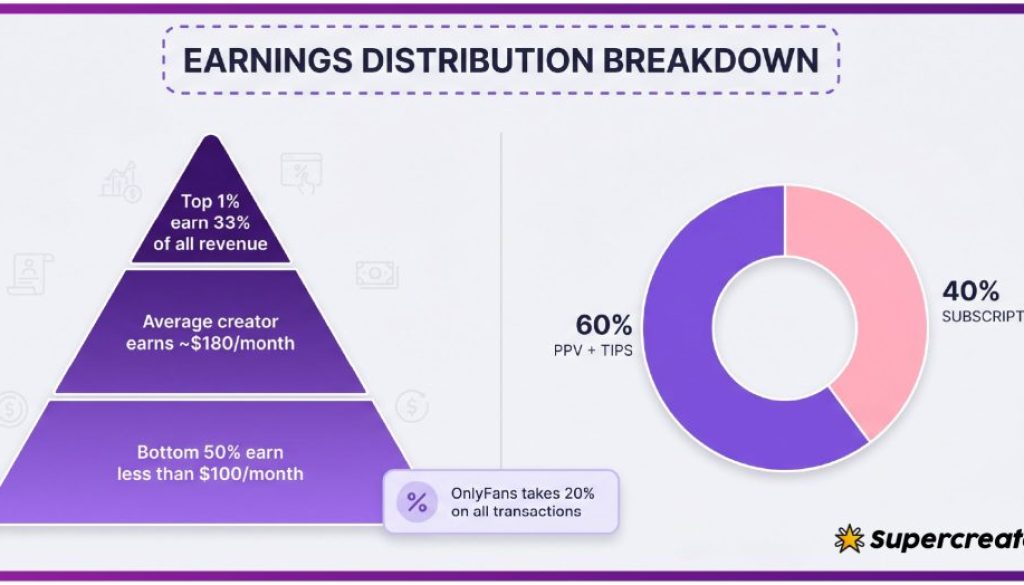
OnlyFans takes a 20% platform fee on everything and the creator keeps 80%. On a paid subscription this is invisible to you because you simply pay the listed price. On a free page it reshapes how creators price small interactions, and those reshaped prices land on your side of the transaction.

- Fee absorbed into pricing. Because a fifth of every transaction goes to the platform, low-priced items carry proportionally more pressure to be priced slightly higher.
- Minimum viable PPV prices. Very small unlocks rarely make sense for a creator after the fee, so message prices tend to start at a practical floor rather than a trivial one.
- Message delivery in paid chat. Direct replies commonly run $3-$5 per message, and each one is a separate charge rather than a session fee.
- Bundle psychology. Multi-item PPV bundles feel like a discount but raise the single-decision cost above a one-off unlock.
- Tip normalization. Tips are framed as voluntary but appear alongside paid content often enough to feel like part of the routine.
It is simply embedded in mechanics that casual browsers never read about, because there is no invoice summarizing it.
Tip: treat every PPV prompt as a priced product, not a message. If you would not buy it as a standalone item at that price, declining costs you nothing and your access to the public feed remains unchanged.
Message-Based Revenue Streams on Free Pages
Four interaction types cover the vast majority of it, and they differ sharply in how much control you retain.
| Interaction Type | Typical Price Range | Frequency Control |
|---|---|---|
| PPV single unlock | Varies by creator, capped at $50 | You decide per message; declining has no penalty |
| PPV bundle | Higher per decision than a single unlock | You decide, but the larger amount raises commitment |
| Paid chat message | Commonly $3-$5 per message | Fully yours; each reply is a separate charge |
| Tip | Any amount, occasionally reaching $100 | Entirely voluntary and unprompted |
The pattern to notice is that cost predictability falls as you move down the table. PPV unlocks sit in the middle: a single clear decision, repeated often.

Documenting Your Actual Monthly Free-Page Spending
There is no monthly bill on a free page, so the only way to know your real number is to build one yourself. Pick one method and stay with it for a full month before judging whether free pages are cheaper than paid ones for you.
- Screenshot receipts with date sorting. Capture the confirmation for every unlock, chat payment, and tip, then sort by date at month’s end.
- Spreadsheet logging by creator and type. One row per transaction with columns for date, page name, category, and amount gives you a per-creator cost immediately.
- Bank statement categorization. Tag OnlyFans charges under a single category so the monthly total is visible without manual addition.
- Wallet review if you use one. Any prepaid balance should be reconciled against your log, since topped-up funds are easy to treat as already spent.
A practical benchmark comes from paid tiers. Standard paid subscriptions cluster around $4.99-$15, with most averaging $5-$10. If your free-page log consistently exceeds that range across several accounts, the free label is not saving you money.

Behavioral Triggers That Increase Unlock Frequency
Spending on free pages is not random. It follows recognizable design and messaging patterns, and naming them makes them easier to resist.
- Countdown timers on PPV. A deadline converts an optional purchase into an urgent one.
- Exclusivity framing. Language suggesting limited availability raises perceived value without changing the price.
- Progressive price escalation. Early low-cost unlocks establish a spending habit that later, higher-priced messages rely on.
- Social proof through like counts. Visible engagement signals that others bought, which normalizes the purchase.
- Direct response requests. A personal-sounding message asking for a reply pulls you into paid chat rather than a passive feed.
The common thread is momentum, since each small transaction lowers the psychological cost of the next one. Weekly review therefore beats monthly review: catching an escalation pattern in week two is cheaper than discovering it in week five.
The Conversion Arc: Free to Paid Page Transitions
When a creator raises the base price from $0 to a paid tier, that price must sit at $4.99 or above, since $4.99 is the platform minimum and $49.99 the maximum. Promotional first months can be lower, for example a $3 first month, but the base price cannot.
Auto-renewal stops at the moment of the increase, which is a detail most subscribers miss. Your access continues until the paid period you already hold ends, and then it lapses unless you actively resubscribe at the new rate.
Checking the subscription status of long-followed free pages once a month catches these transitions before they renew. It also flags pages that quietly flipped from free to paid while you were not looking.
Comparing Discovery Costs on Free Pages
Whether they actually function as sampling tools depends on how much you spend while sampling, which is exactly what the table below isolates.
| Discovery Method | Upfront Cost | Total Exploration Cost |
|---|---|---|
| One paid subscription at $10 | $10 | Fixed at $10 for the period; no further charges to view the feed |
| Three free pages with moderate PPV | $0 | Variable; a few unlocks per page can exceed $10 quickly |
| Pre-filtering through ranking cards before spending | $0 | Lowest; you compare profiles and pricing signals before any purchase |
Communities that compare rankings and pricing experiences are useful here, and a free onlyfans forum can show what other subscribers actually paid before you commit anything. The advantage is not the free access itself but the pre-purchase comparison it enables.

Seen this way, the cheapest exploration path is not following many free pages. It is narrowing the list first, then following two or three, which keeps variable costs from outrunning a single fixed subscription.
Maintaining Budget Discipline Across Multiple Free Accounts
Aggregate control is the real challenge. One free page rarely causes a problem; eight free pages with occasional unlocks do. The fix is a single budget that spans all accounts rather than a mental limit per page.
- Set a total monthly limit before following anything new. Decide the number first, then let the page count fit inside it.
- Review cumulative spending weekly. Weekly totals surface drift while it is still small enough to correct.
- Pause new unlocks when the threshold nears. A hard pause in the final week is more effective than trying to reduce gradually.
- Rank pages by value received. Compare what you actually got against what you paid for each account.
- Unfollow low-value accounts proactively. Removing the inbox removes the prompts, which is the simplest form of cost control available.
There is also a minor housekeeping cost worth knowing about: card verification places a $0.10 hold that is refunded within days. It is not spending, but it does appear on statements and can confuse an otherwise clean log.

BestOnlyFans treats these numbers as planning inputs rather than warnings. A free page with a documented monthly total is a manageable expense; the same page with no record is an unknown one.
Start with one tracking method this week, set a single monthly ceiling, and review the total before adding any new page. A free subscription is only cheap when you can state what it actually cost you last month.
FAQ
Do free OnlyFans pages notify me before charging for content?
Yes. Pay-per-view content arrives as a message with a price attached, and nothing is charged until you actively unlock it. Paid chat works the same way: you see the per-message rate before sending, since replies commonly run $3-$5 per message. Tips are always initiated by you, so there is no mechanism that deducts money from a free page without an explicit action.
How can I see my total spending on free pages if there’s no monthly bill?
Build the record yourself. The most reliable approach is a spreadsheet with one row per transaction, listing the date, page name, category, and amount. Any prepaid wallet balance should be reconciled against your log, because topped-up funds are easy to forget once they leave your card.
What happens to my access if I decline a PPV message on a free page?
Nothing changes. Declining a pay-per-view message has no effect on your subscription, because a free page has no paid tier to lose. You keep full access to the public feed and you continue receiving future messages.
Is there a way to filter free pages by their typical PPV price range?
OnlyFans has no built-in discovery feed or directory, so there is no native filter for PPV pricing. Third-party ranking sites let you review profile details and reported pricing patterns before you follow anything. Combining that pre-filtering with a written monthly limit keeps exploration costs from becoming the largest part of your total spend.